

I downloaded Arby’s - Pickup or Delivery expecting a fairly simple restaurant-ordering tool, and that is exactly where its appeal begins. It is a free Food & Drink app from Arby’s Restaurant Group, Inc. that puts ordering, deals, and the Loaded Rewards™ program in one place. I found it most useful when I already knew what I wanted and needed a quicker route from craving to pickup or delivery, rather than when I was browsing for a completely new meal.
The first impression is helped by the app’s clear purpose. It is not trying to become a general food marketplace or a social food diary. It is built around Arby’s, so the useful question is not whether it replaces every restaurant app on your phone, but whether you visit Arby’s often enough for a dedicated account and rewards balance to make sense. In my experience, that distinction matters more after the first few orders than it does during the initial download.
From an easy first order to a routine worth keeping
Why the first week feels worthwhile
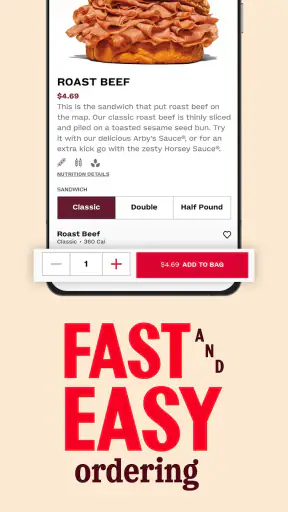
The strongest first-week benefit is convenience. Instead of joining a line and deciding at the counter, I can look through the available Arby’s menu, choose pickup or delivery, and complete the order in the same restaurant-specific space. That makes the app particularly practical when I am ordering during a short lunch break, collecting food on the way home, or trying to avoid making several decisions while hungry.
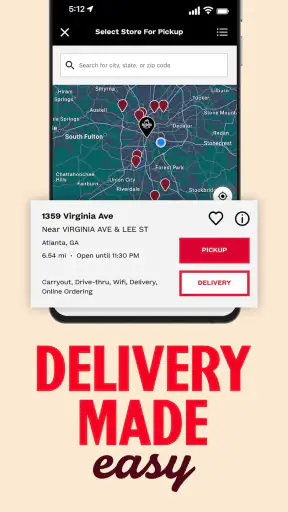
The distinction between pickup and delivery also gives the app two different roles. Pickup is the better fit when I am already passing a restaurant and want to reduce waiting at the counter. Delivery is more useful when staying home matters more than keeping the order as simple as possible. I would not treat those choices as interchangeable: the best option depends on distance, timing, and whether I am willing to accept the extra complexity that can come with having food brought to me.
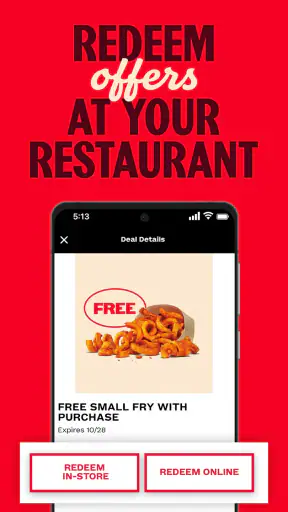
I also like that the app’s main reason to return is not merely the ordering screen. Its store summary centers on Loaded Rewards™ points and deals, so the experience is designed to continue after the first transaction. That gives a new user an immediate reason to create a habit: place an order, check the rewards area, and see whether the next visit can be made more useful than the last.
For a realistic weekday example, imagine finishing work later than planned and wanting a quick meal without stopping to study a full restaurant marketplace. I would open the app, select a nearby location, choose pickup if I were already driving past it, and review the current deal before paying. If I were home and did not want to leave again, delivery would make more sense. The important advantage is not that either choice is revolutionary; it is that both are organized around one familiar restaurant.
What I would check before relying on it
My first practical tip is to choose the restaurant location before spending too much time building an order. A menu can be easy to browse, but the useful experience depends on the location serving the order and the method selected. Starting with the store and fulfillment choice reduces the chance of assembling a meal only to rethink it when the available option changes.
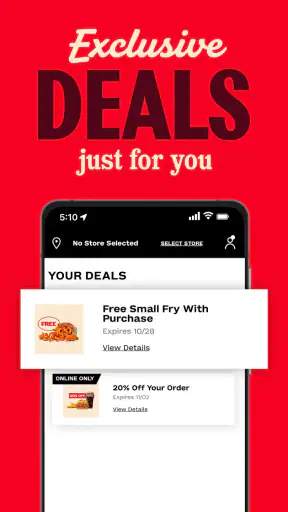
I would also review the rewards and deal details before finalizing the basket, not after. A dedicated restaurant app often earns its place through small recurring savings rather than one dramatic feature. Checking that area as part of the normal ordering routine is more reliable than assuming a reward will automatically be the best choice for every visit.
Another useful habit is to treat the app as a planning tool, not only an emergency button. If I know I will be collecting food at a busy time, placing the order in advance can make the visit feel more controlled. I would still allow myself a little flexibility, because restaurant preparation and delivery timing can vary. The app can make the ordering step smoother, but it cannot remove every real-world delay.
How it compares with the usual alternatives
Compared with ordering in person, the app gives me more time to review the menu and deals without holding up a queue. That is its clearest everyday advantage. Compared with a broad delivery marketplace, it is narrower but more focused: I am not comparing several restaurants, yet I am dealing directly with Arby’s ordering experience and its own rewards system.
That focus is also the main trade-off. If I am undecided between Arby’s and several nearby restaurants, a general marketplace is more convenient for comparison. If I already want Arby’s, the dedicated app is the more natural place to look first, especially when rewards or restaurant-specific offers influence the decision. I would not install it expecting a universal food-ordering solution.
The details that matter after the novelty fades
The app has a 4.6 average from around 272 thousand ratings, with more than 5 million installs. Those figures suggest that it has reached a substantial audience, but they do not decide whether it belongs on my phone. A person who visits Arby’s once a year may gain little from another restaurant app, while a regular customer can find the dedicated rewards workflow worthwhile.
It is rated for Everyone, which makes it broadly approachable for ordinary household use. The app was released on March 4, 2018, and the current version is 2026.16.13. It requires iOS 11 or later, a modest requirement that makes it accessible on many older Apple devices. I would still keep the app updated, because ordering tools depend on current menu, account, and checkout behavior more than a static reference app does.
Month-to-month value comes from repetition
After the first few orders, I stop judging the app by how polished the opening screen feels and start asking a more useful question: does it improve a repeated Arby’s visit? For me, the answer depends on three habits—checking deals, remembering to use the rewards program, and selecting the right fulfillment method for the situation.
Loaded Rewards™ points give the app a reason to remain installed between visits. The value is cumulative in the everyday sense: one order may not change my routine, but repeated orders can make the account more useful than ordering anonymously each time. I would think of the rewards feature as a nudge toward consistency rather than a reason to order food I did not already want.
That distinction protects against a common mistake. A deal is only valuable if it fits the meal I intended to buy. I would not add unnecessary items simply to feel that I had “used” an offer, and I would not make an extra trip just because the app displayed a reward. The best long-term use is to let the app support an existing Arby’s habit, not create an expensive one.
For households, the app can also simplify a repeat decision. If one person usually handles pickup, keeping the restaurant ordering process in one place may be less frustrating than passing around a menu or searching through a marketplace each time. On the other hand, people with different preferences may still find a broad delivery service better when the meal needs to combine restaurants or accommodate several unrelated orders.
A practical rewards workflow
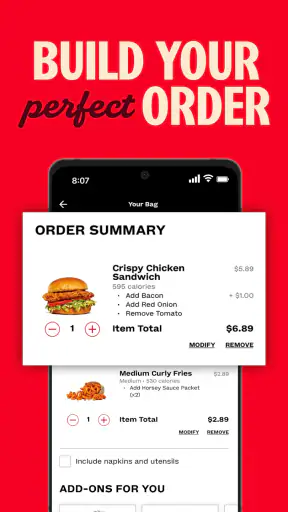
My preferred routine would be simple: open the app when I begin considering Arby’s, select the location and pickup or delivery method, inspect the available deal, build only the meal I actually want, and then check the rewards status before submitting. This sequence keeps the reward from becoming an afterthought while preventing the menu from turning into an invitation to overspend.
I would also avoid assuming that every visit should use the same method. Pickup is usually the cleaner choice when I am nearby, while delivery earns its place when convenience at home is the priority. Switching between them is not a failure of routine; it is one of the app’s practical strengths, provided I make the choice deliberately instead of accepting the first option presented.
One less obvious trade-off is that a restaurant-specific rewards balance can be more motivating than a general marketplace’s broader selection, but it is also less flexible. The points and deals are tied to my Arby’s usage. If my eating pattern changes or I begin ordering from many different restaurants, the dedicated value naturally becomes weaker.
The maintenance burden is small, but not zero
The app is free, which removes the biggest barrier to trying it. Still, “free” does not mean maintenance-free. I need to keep an account usable, remember to check rewards, choose the correct restaurant, and stay aware of whether pickup or delivery actually suits the moment. Those are small tasks, but they are the difference between an app that helps and one that becomes digital clutter.
I would keep notifications under control rather than allowing every reminder to interrupt the day. The app is most useful when I open it with a genuine ordering intention. If alerts become noise, I am less likely to notice a relevant deal and more likely to disable everything, including the messages that could have been useful.
Account upkeep is another reason to be realistic. A dedicated restaurant app is worth maintaining when I use the restaurant regularly enough to remember the login and rewards routine. If I only want occasional delivery, a general service I already use may require less mental overhead, even if it offers a less direct connection to Arby’s rewards.
The current version number, 2026.16.13, shows that the app is actively presented as a current product rather than an abandoned download. I still would not interpret version updates as a promise that every interaction will be perfect. Restaurant apps sit between software and physical operations, so a smooth screen cannot guarantee a perfectly timed meal, a fully stocked location, or an effortless handoff.
Where fatigue can set in
The first source of fatigue is repetition. If I order the same meal frequently, browsing can feel like an unnecessary step compared with walking in and speaking to staff. The app earns its place when the rewards, deal checking, or pickup convenience outweighs that extra digital layer.
The second is the narrow scope. I cannot use this app to compare Arby’s with another chain or combine several restaurants into one plan. That is not a flaw in its intended purpose, but it becomes a limitation when my real need is choice rather than speed. In those situations, a broader food-ordering alternative is better.
The third is the gap between digital certainty and real-world timing. Selecting pickup does not make the restaurant invisible, and selecting delivery does not turn a meal into an exact appointment. I would use the app to reduce ordering friction, not to promise myself that every busy period will behave predictably.
There is also a behavioral risk in rewards-centered ordering. Points and deals can make a familiar purchase feel more compelling, but they should not override budget or appetite. My rule would be straightforward: the app should help me buy a meal I already want at a more convenient moment, not persuade me to spend merely because a reward is waiting.
Who should keep it installed
I would recommend keeping it installed if Arby’s is a recurring choice, if I regularly use pickup or delivery, or if I am willing to check Loaded Rewards™ before completing an order. Those users can turn the app into a repeat-use shortcut instead of a one-time novelty.
It is also a good fit for someone who dislikes ordering at a counter while deciding. Browsing privately, choosing a location, and selecting the fulfillment method ahead of time can make the meal feel less rushed. For a busy parent, commuter, or office worker, that reduction in small decisions may be more valuable than any single deal.
I would skip it if I rarely visit Arby’s, strongly prefer comparing multiple restaurants, or already have a general delivery app that handles every order adequately. Installing a separate app for one occasional meal adds another account and another routine without guaranteeing meaningful savings.
My long-term verdict
After the initial novelty fades, Arby’s - Pickup or Delivery survives on practical repetition rather than entertainment. It gives regular Arby’s customers a focused way to order, select pickup or delivery, and keep an eye on Loaded Rewards™ points and deals. Those are modest benefits, but they line up with a real weekly or monthly use case.
My honest recommendation is conditional: keep it if Arby’s already appears in your normal meal rotation, and use the rewards check as part of the ordering workflow rather than treating it as a separate chore. I would not recommend it as a replacement for a multi-restaurant marketplace, and I would not expect the app alone to solve timing or availability issues at the restaurant.
The strongest reason to download it is recurring convenience for an existing Arby’s habit. The weakest reason is curiosity without a likely future order. Because it is free and rated for Everyone, trying it costs little in money, but its lasting space on my phone has to be earned through repeated usefulness. For regular customers, it does enough to earn that space; for everyone else, the usual alternatives may remain the simpler choice.


